
AiDevelopment
How I Designed a Bloomberg Terminal Aesthetic for a Shopify Store — The Full Creative Brief
Ninety percent of Shopify stores use the same three fonts and the same rounded-corner cards. I wanted The Exchange to look like it belonged on a trading floor, not a template marketplace....
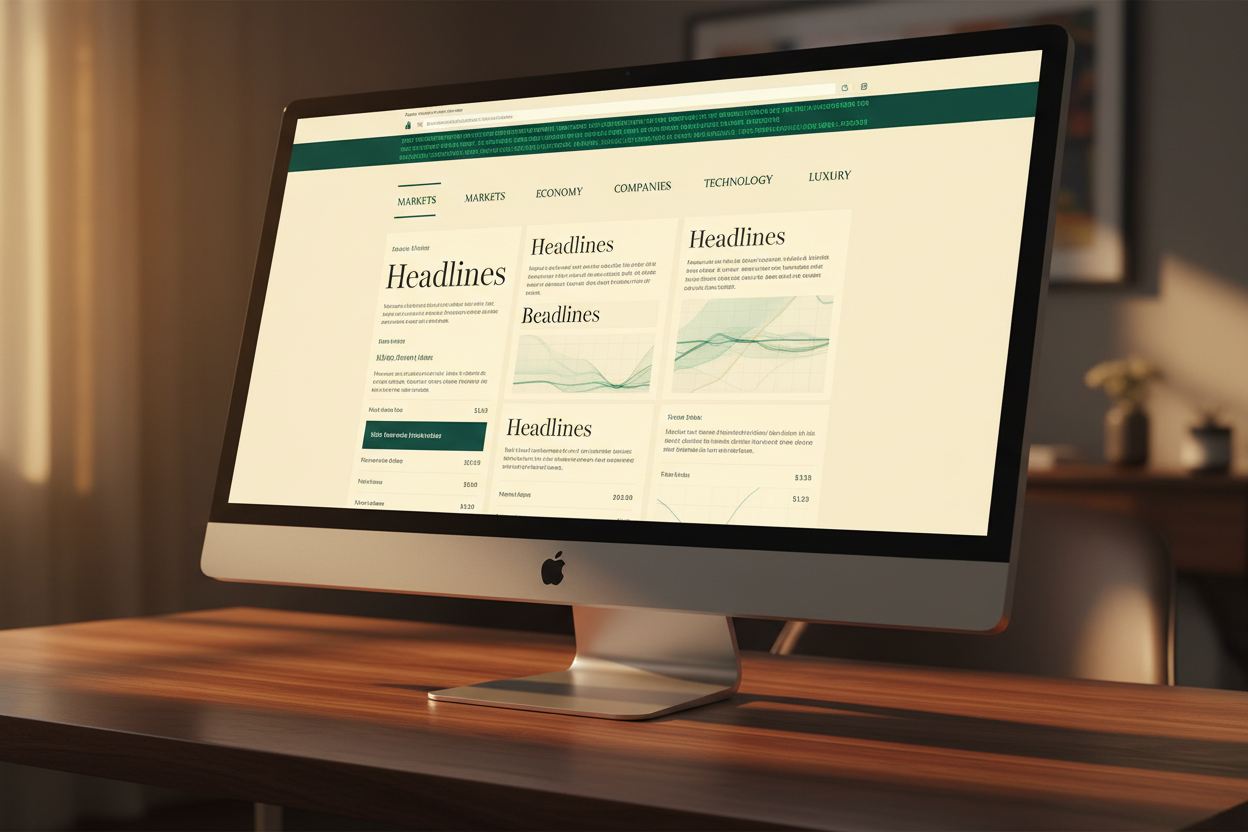
Quick Answer: I designed The Exchange — the theme that runs EcomChief's PrebuiltStack.com marketplace — around a Bloomberg terminal and Sotheby's auction catalogue reference, using a locked four-color palette, a serif-and-monospace typography pairing, zero border-radius, and spring-based motion to make ready-made businesses feel like tradeable financial assets rather than generic products. This post is the complete creative brief behind that decision — the references, the specific values, and the reasoning for every choice — so you can see exactly what separates a designed store from a templated one.
Open ten random Shopify stores right now and I'd bet at least seven of them use a rounded sans-serif font, a blue or green accent color, and card components with 8px rounded corners and a soft drop shadow. That's not a criticism — it's just what the default theme options produce when nobody makes an active design decision to depart from them. When I started designing The Exchange, the theme that runs PrebuiltStack.com and underpins the design language across EcomChief's catalog, I wanted something that didn't just avoid that default — I wanted it to look like it belonged somewhere else entirely. Not an ecommerce store. A trading floor. An auction house. A place where the products being listed are treated as assets with verified value, not inventory with a discount code. This post is the complete creative brief behind that decision — every reference, every color value, every typographic and motion choice, and the reasoning that connects them.

How Do I Make My Shopify Store Look Premium — Starting With References, Not Colors
Key Takeaway: The most common mistake in Shopify design is starting with a color palette before establishing a reference world — premium design comes from borrowing the visual language of an entirely different industry, not from picking nicer colors within the ecommerce default.
Every design brief I write for a new EcomChief store — and every one I've written for The Exchange specifically — starts with a reference question, not a color question. What existing visual world does this store's buyer already trust? For a store selling verified, ready-made business assets, the honest answer wasn't another ecommerce store. It was financial media and auction houses — places where trust, verification, and value are the entire point of the visual language.
Bloomberg terminals communicate authority through density, monospace data, and a restrained, almost austere color discipline — everything on screen has a reason to be there, and nothing is decorative. Sotheby's auction catalogues communicate value through generous white space, serif editorial type, and a quiet confidence that doesn't need to shout. Neither of those worlds looks anything like a typical Shopify store, and that's exactly the point. If your store looks like every other store in your category, you've inherited that category's price ceiling. If it looks like something else entirely — something the buyer already associates with trust and value — you borrow that association. This principle applies whether you're designing a financial marketplace like PrebuiltStack or a completely different niche; the reference world changes, but starting there instead of with a color wheel doesn't.
The Locked Palette — Four Colors, No Exceptions
Key Takeaway: The Exchange uses exactly four colors with fixed hex values and no situational exceptions — Paper, Ink, Emerald, and Gold — and the discipline of never introducing a fifth color anywhere in the theme is what makes 24 different sections feel like one designed object.
Paper — #f6f3ec. A warm, slightly aged cream rather than pure white. This single choice does more work than almost any other decision in the palette — pure white reads as generic SaaS or default Shopify. A warm cream immediately signals editorial print, paper stock, something considered rather than exported from a template.
Ink — #161512. A near-black with a faint warmth to it, used for all primary text and structural elements. Not pure black, which can feel harsh and digital against the warm Paper background. Ink pairs with Paper the way genuinely good print design pairs dark type with cream stock.
Emerald — #0b6e4f. The single accent color used for interactive elements, live indicators, verified tags, and the data ticker. Deep and slightly muted rather than bright — a bright emerald would read as playful. This one reads as considered, closer to the deep greens found in financial branding and private banking.
Gold — #b8862f. Reserved specifically for verification and premium signaling — the "verified" tag state, key accent details on featured listings. Used sparingly is what makes it effective; if gold appeared everywhere in the theme it would lose all of its signaling power. It appears in perhaps 5% of the visual surface area across the entire site, and that scarcity is deliberate.
Four colors, full stop. No fifth color ever gets introduced for a "special" section or a one-off need. That discipline — documented in detail in our post on why I carry a full design system into every AI session — is what prevents 24 individually-built sections from drifting into 24 slightly different color interpretations over months of development.

Typography — Why Fraunces and IBM Plex Mono, Specifically
Key Takeaway: Pairing a warm editorial serif with a technical monospace typeface creates deliberate tension between "trustworthy publication" and "verified data system" — exactly the dual signal a marketplace selling verified business assets needs to send simultaneously.
Fraunces handles every headline in the theme, set light at weight 300 to 400 — never bold. It's a variable serif with real personality in its curves, closer to what you'd see on a design magazine cover than a typical web font. Using it at a light weight rather than the bold weight most themes default to for headlines is what keeps it feeling editorial rather than aggressive.
IBM Plex Mono handles everything else that isn't a headline — navigation labels, buttons, stat figures, the live ticker, tag states. Monospace fonts carry an inherent "data terminal" association because every character occupies identical width — it's the typeface family of code editors and financial tickers. Using it for every UI element, rather than reserving it for one decorative moment, is what makes the Bloomberg reference read as structural rather than superficial.
The tension between those two typefaces — an emotionally warm editorial serif and a coldly precise monospace — is not an accident. It's the entire design thesis compressed into two font choices: this is a place where trust (the serif, the editorial warmth) meets verification (the monospace, the data precision). Most Shopify themes use one sans-serif family throughout and call it "clean." Clean is fine. It's also completely undifferentiated from every other store using the same approach.
What Design References Work for Ecommerce Stores — Beyond Bloomberg
Key Takeaway: The Bloomberg-and-Sotheby's reference works specifically for a financial marketplace, but the underlying method — borrow the visual language of an adjacent trusted industry rather than another ecommerce store — applies to any niche, as demonstrated across the different aesthetic systems built for other EcomChief stores.
I want to be clear that Bloomberg terminals aren't a universal answer — they're the right reference for a store selling verified business assets specifically. Different niches call for entirely different reference worlds, and I've applied this same method across other stores in EcomChief's catalog with completely different results. A men's grooming store borrowed from vintage barbershop signage and editorial menswear photography. A smart home technology store borrowed from consumer tech unboxing videos and minimalist product photography. Neither looks anything like The Exchange, because neither buyer trusts the same visual world The Exchange's buyer trusts.
The transferable lesson, regardless of your niche: identify the industry or media category your specific buyer already associates with credibility, then borrow its visual grammar — color restraint or richness, typography choices, spacing philosophy, motion pacing — deliberately and completely, rather than picking one surface-level element and calling it inspired. A single borrowed color doesn't transfer trust. A fully committed visual system does. You can see this method applied consistently across the design decisions behind EcomChief's digital agency businesses and dropshipping stores — each one borrows a different reference world calibrated to its specific buyer.
Motion and Micro-Interaction — Why Spring Easing, Not Ease-Out
Key Takeaway: The specific animation curve used throughout a theme is as much a brand signal as the color palette — a generic ease-out feels like every other Shopify store's default, while a deliberately chosen spring curve gives every interaction a distinct, premium physical quality.
Every transition and scroll-reveal across The Exchange uses the same specific easing curve — cubic-bezier(0.16, 1, 0.3, 1) — a spring-based motion that overshoots very slightly before settling, giving interactions a physical, tactile quality rather than the flat, mechanical ease-out most themes default to. It's a small technical detail that almost no visitor will consciously notice, and every visitor will unconsciously feel.
This is also where the live data ticker across the top of the site earns its keep — a subtle, continuously scrolling bar referencing real financial tickers, reinforcing the Bloomberg association through motion rather than just static visual elements. Combined with IntersectionObserver-triggered reveals on every section (documented in our post on building 24 custom Shopify sections), the theme feels alive and considered in motion, not just in its static screenshots — which matters enormously because almost every visitor experiences your site by scrolling through it, not by staring at a single frame.

How to Make a Shopify Store Stand Out Visually — The Compounding Effect of Restraint
Key Takeaway: Visual distinctiveness comes less from adding unique elements and more from removing everything a default theme would otherwise include — the absence of border-radius, drop shadows, and gradient overlays throughout The Exchange is as intentional and as visible as any color choice.
Zero border-radius, everywhere, on every card, button, and container in the theme. No drop shadows. No conic-gradient backgrounds. Those three exclusions, applied without exception across all 24 sections, do more to make The Exchange feel distinct from a typical Shopify store than any single addition could. Rounded corners and soft shadows are the default aesthetic of nearly every theme in the Shopify marketplace — removing them entirely, and holding that line even when a particular section might look "fine" with a rounded corner, is what makes the whole theme read as a deliberate departure rather than a themed Shopify store with different colors.
This is the part of premium design that's genuinely hard to teach because it's counterintuitive — most people assume standing out means adding something. In practice, the fastest way to look like every other Shopify store is to accept every soft default the theme editor offers you. The fastest way to look different is to identify those defaults specifically and remove them with discipline, then replace them with values that serve your specific reference world instead. EcomChief holds every store in the full catalog to this same standard — not because every niche needs zero border-radius specifically, but because every niche needs its own deliberate exclusions list, decided in advance and held without exception.
See This Design System Applied to a Real Marketplace
Key Takeaway: The Exchange design system described in this post is the same standard applied across every store in EcomChief's catalog — a deliberate, referenced visual language rather than a themed default.
The stores in EcomChief's catalog are built using the exact method described in this post. Not templated. Not assembled from a page builder. Custom sections, locked design systems, production-ready Liquid — the same standard I hold my own theme to. If you want to own a store built this way without spending months developing the method yourself, this is where to start.
The Bottom Line
Key Takeaway: Making a Shopify store look premium is a reference and discipline problem, not a color-picking problem — choose a trusted visual world your specific buyer already recognizes, lock a small palette and typography pairing to it without exception, and remove every default the theme editor would otherwise hand you.
The Exchange looks like a Bloomberg terminal crossed with a Sotheby's catalogue because that was the deliberate reference world chosen for a store selling verified business assets — not because those references are universally "premium." The method transfers to any niche: identify the trusted visual world your buyer already believes in, lock a small, disciplined palette and typography system to that world, and hold every exclusion without exception across every section you build. That discipline, more than any individual color or font, is what separates a designed store from a themed one. Every store in EcomChief's catalog is held to this same standard, calibrated to its own specific buyer.
Helpful EcomChief Resources
Key Takeaway: These links connect this creative brief to the technical build process behind The Exchange and to EcomChief's ready-made stores built using the same design discipline.
Here are useful links to continue your research:
- Ready-Made Digital Agency Businesses
- Ready-Made Dropshipping & Ecommerce Stores
- Ready-Made Affiliate Sites
- Ready-Made Apps & SaaS Starters
- Business Bundles
- What's Included in Every Sale
- The Handover Process — Step by Step
- Free EcomChief Tools
- Talk to EcomChief Directly
- I Built 24 Custom Shopify Sections With No Coding Background
- How I Use Claude as a Senior Developer I Direct, Not a Tool I Operate
- Why I Carry a Full Design System Into Every AI Session
- I Built a Complete Shopify Theme Without Writing a Single Line of Code
If you want to see this design system applied to a live, purchasable marketplace, browse EcomChief's full catalog and check the design consistency across every page type — not just the homepage.
Related reading
All articles


Free Online Business Calculators
Estimate costs, profits, ROI, affiliate earnings, and business value before you spend money.